

The Apple MacBook Air M2 is proudly recognized as the best lightweight laptop for students in 2025. With its sleek design, impressive performance, and excellent battery life, it is tailored for academic success. This review delves into its various features, configurations, pricing, and why it stands out as the go-to device for students.
| Aspect | Rating |
|---|---|
| Portability | ★★★★★ |
| Performance | ★★★★★ |
| Battery Life | ★★★★★ |
| Value for Money | ★★★★☆ |
| Specification | Details |
|---|---|
| Display | 13.6-inch Retina |
| Weight | 2.7 pounds |
| Processor | Apple M2 Chip |
| RAM Options | 8GB or 16GB |
| Storage Options | 256GB, 512GB |
| Battery Life | Up to 18 hours |
Design & Build Quality
The Apple MacBook Air M2 is crafted with high-quality materials, boasting a sleek and sophisticated aluminum finish. At just 2.7 pounds, it is one of the most portable options available, making it the best lightweight laptop for students who need to carry it between classes. The stunning 13.6-inch Retina display provides vibrant colors and sharp images, ideal for studying and online learning. The mechanism of the keyboard is smooth and comfortable, which is crucial for long typing sessions, whether for essays or research papers.
Performance
Backed by the powerful Apple M2 chip, the MacBook Air M2 offers stellar performance. The laptop handles various student tasks, from browsing the internet to running complex applications, without any lag. It features an 8-core CPU and a 10-core GPU, ensuring efficient completion of comprehensive tasks, making it ideal for graphic design students, programming, and video editing. The ability to run multiple applications smoothly enhances productivity, marking it as an essential device for students aiming for excellence in their studies.
Ease of Use
The MacBook Air M2 is designed with user-friendliness in mind. The familiar macOS interface makes navigation simple, allowing students to easily find applications and tools necessary for their coursework. Initial setup is quick and establishing accounts for educational resources is straightforward. Additionally, with up to 18 hours of battery life, students can confidently use the laptop throughout the day without worrying about finding a power source, which is vital during a busy academic schedule.
Key Features
The Apple MacBook Air M2 features several notable specs and configurations tailored to student needs. The base model available with 8GB RAM and a 256GB SSD is priced at $689, which is competitive in the market for high-performing laptops. If more storage is needed, the 8GB RAM and 512GB SSD option is offered at $889. This flexible pricing allows students to select a configuration that best suits their academic and financial needs. Beyond just specifications, the MacBook Air also integrates seamlessly with a variety of educational tools and software, enhancing its appeal as a dedicated laptop for students.
Price & Value
The value of the MacBook Air M2 is evident not only in its specifications but also in its competitive pricing. Given its performance capabilities and build quality, the starts at $689 for the essential configuration, making it an affordable option for students seeking the best lightweight laptop for their educational needs. Compared to rival models, the MacBook Air provides significant advantages in performance and longevity. Its ability to withstand the test of time is an attractive proposition, further justifying its price tag as a smart investment for educational purposes.
| Laptop Model | Price | Rating |
|---|---|---|
| Apple MacBook Air M2 | $689 (256GB), $889 (512GB) | ⭐⭐⭐⭐⭐ |
| Dell XPS 13 | Approx. $949 | ⭐⭐⭐⭐☆ |
| HP Spectre x360 | Approx. $1,099 | ⭐⭐⭐⭐☆ |

- Apple M2 8-Core Chip 16GB Unified RAM | 256GB SSD
- 13.6″ 2560 x 1664 Liquid Retina Display 8-Core GPU | 16-Core Neural Engine
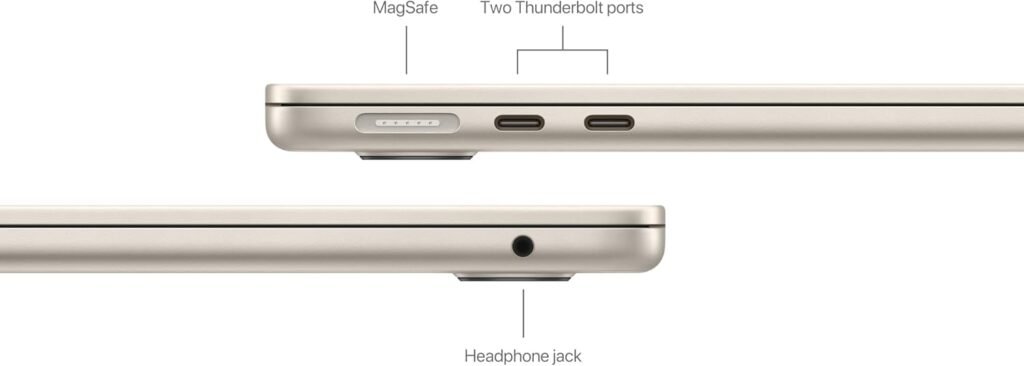
- Wi-Fi 6 (802.11ax) | Bluetooth 5.0 Thunderbolt 3
Conclusion
In summary, the Apple MacBook Air M2 sets a new standard as the best lightweight laptop for students in 2025. Its remarkable combination of portability, performance, and battery life makes it an exceptional investment. The flexible pricing options ensure there is an appropriate model for various student needs, accommodating budgets while providing top-tier functionality. With its sleek design and robust capabilities, the MacBook Air M2 is undoubtedly a smart choice for students looking to excel in their academic pursuits.
🛒 Check Current Price on Amazon
Frequently Asked Questions
What configurations are available for the MacBook Air M2, and how do their prices compare?
The Apple MacBook Air M2 is available in several configurations that allow students to choose the option that best fits their needs. The most affordable model features 8GB of RAM combined with a 256GB SSD, priced at $689. This base model provides ample storage for notes, documents, and some applications, making it a great choice for typical student tasks. For those needing extra storage, the 8GB RAM and 512GB SSD model is available for $889. This higher configuration is ideal for students who may engage in creative projects, needing more space for larger files or programs. Choosing the right configuration will depend on the individual student’s major and usage patterns, and both options offer exceptional value in terms of performance and durability.
Is the Apple MacBook Air M2 suitable for students who are majoring in software development?
Yes, the Apple MacBook Air M2 is more than suitable for students majoring in software development. Thanks to its M2 chip, the laptop boasts impressive computational power and the ability to run demanding applications with speed and efficiency. Developers will appreciate the capabilities of integrated tools like Xcode, allowing for smooth coding, testing, and compiling. The lightweight nature of the device allows for easy transport between lectures, while the long battery life ensures students can code without having to constantly look for power outlets, a significant advantage for those spending long hours on study or development projects. Overall, the MacBook Air M2 delivers impressive performance and portability to accommodate software development courses effectively.
How does the Apple MacBook Air M2 perform for online learning and remote classes?
The Apple MacBook Air M2 performs excellently for online learning and remote classes. Its Retina display offers sharp and vibrant visuals, making it easy to participate in virtual lectures or view educational content without straining the eyes. The M2 chip ensures that video calls are smooth and responsive, eliminating lag that could disrupt communication during classes. Additionally, with features such as built-in FaceTime HD camera and high-quality speakers, interactions during online classes become seamless. Its battery life of up to 18 hours makes it perfect for long study sessions or streaming live classes without worrying about an outlet’s proximity. Overall, the MacBook Air M2 proves to be an ideal tool for students adapting to remote learning environments, successfully combining functionality with efficiency.

